
Launching UI After Installation
Once installed, ADG can be launched in the following ways:
- Double-click the installer
- Open a browser and go to:
http://localhost:8081
(If installed on a different port, update the URL accordingly)
🔒 Security Considerations
- The ADG user interface is not remotely accessible via a browser.
- For remote access:
- Use RDP (Remote Desktop Protocol) to connect to the ADG workstation.
- Access ADG as if you were physically at the machine.
- The interface is available to any user with local administrative privileges on the ADG workstation.
⚠️ Troubleshooting: UI Not Visible
If you cannot see the ADG UI:
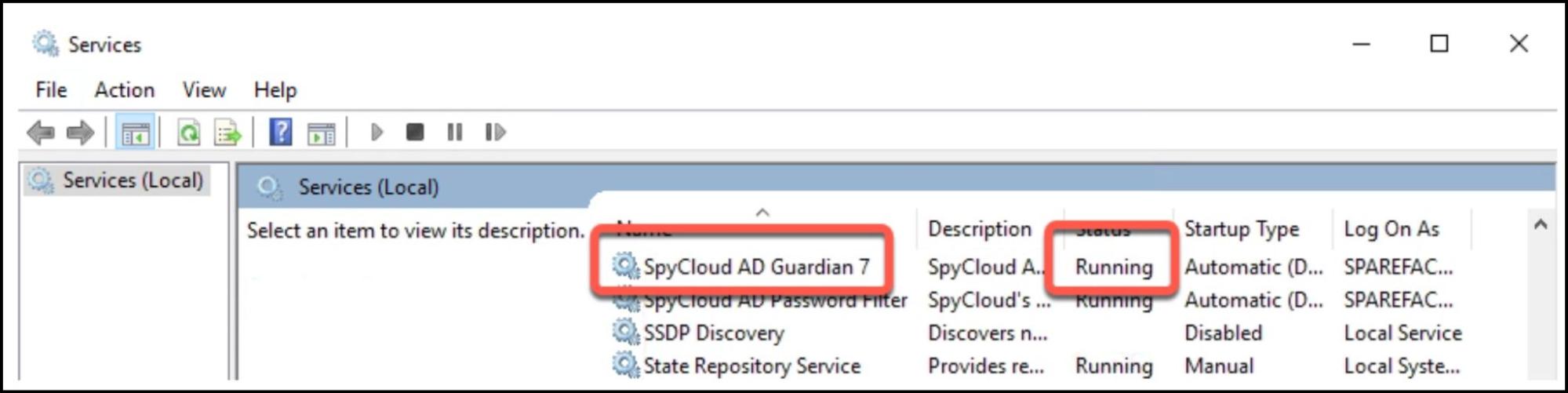
- Verify that the ADG service is running.
- Open the Services application in Windows:
- Search for
Servicesin the Windows search bar.
- Search for
- Confirm that the service is active.
| Service Name | Description |
|---|---|
| SpyCloud AD Guardian 7 | The Windows service powering ADG UI |
Updated about 1 year ago
Did this page help you?