
Entra ID Guardian
Automatically reset exposed passwords and revoke sessions in Azure environments.
Entra ID Guardian helps you identify and remediate exposed passwords and authentication artifacts associated with your Microsoft Entra ID workforce identities.
One Entra ID Guardian license supports two implementations:
- SpyCloud Console: Identifies exposed session cookies and refresh tokens and initiates session revocation through Entra ID.
- Azure application: Checks active Entra ID accounts for exposed passwords, confirms exact matches, and runs configured remediation actions.
Use either implementation independently or both together to address two ways attackers gain access to workforce accounts: authenticating with exposed passwords or hijacking existing sessions.
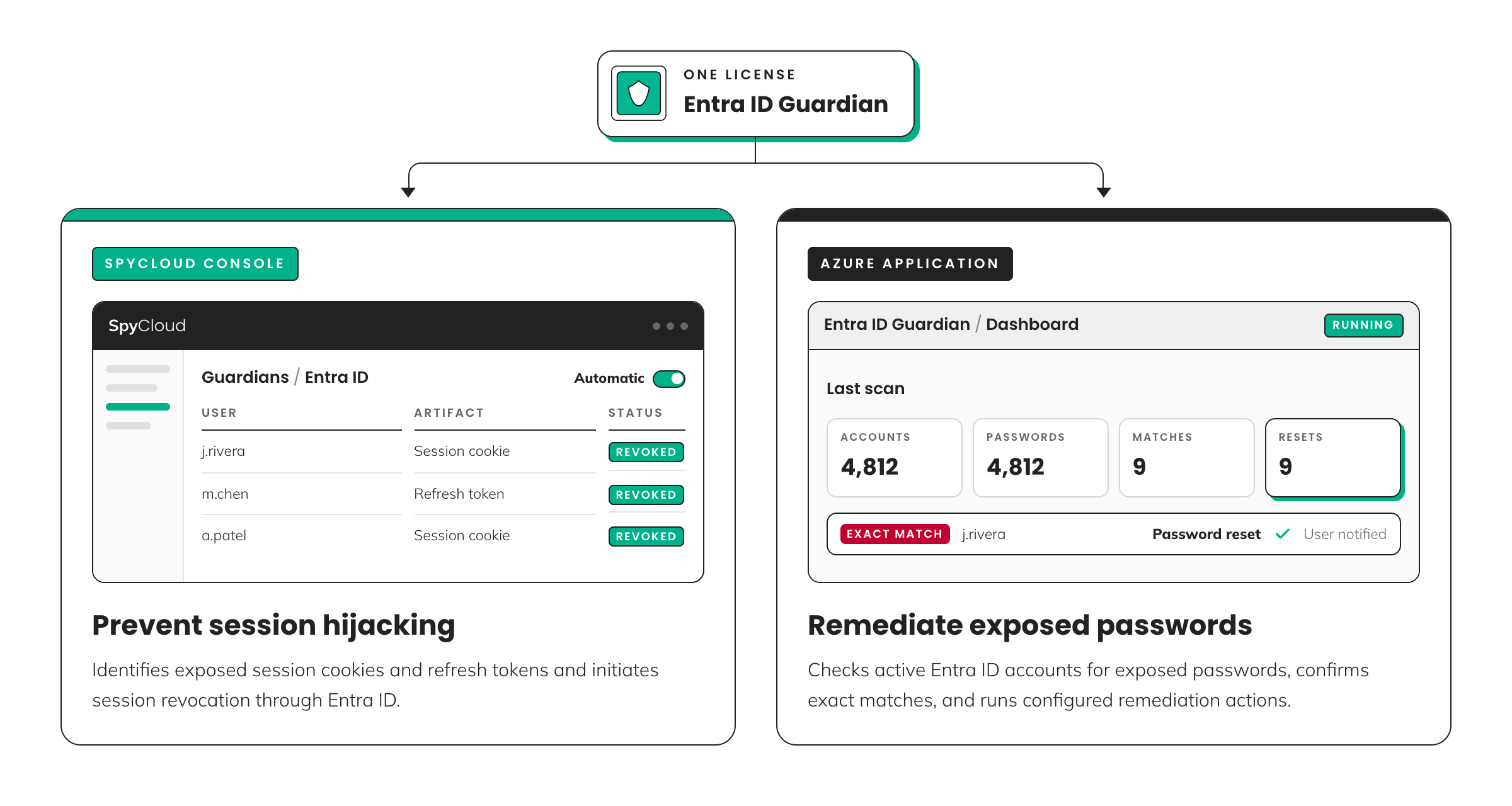
Choose how to use Entra ID Guardian
| SpyCloud Console | Azure application | |
|---|---|---|
| Protects against | Session hijacking | Account takeover using exposed passwords |
| Identifies | Exposed sessions, refresh tokens, and supported authentication artifacts | Exposed passwords matching active Entra ID accounts |
| Remediation | Initiates session and refresh token revocation through Entra ID | Resets passwords, logs matches, and sends notifications |
| Configuration | Dry run, Manual, or Automatic | Enable or disable password resets and configure notifications |
| Runs in | SpyCloud Console | Your Azure environment |
Two implementations. One license.
You don't have to choose one or the other. Each implementation addresses a different type of exposed access, and you can use them independently or together.
SPYCLOUD CONSOLE - ENTRA ID GUARDIAN
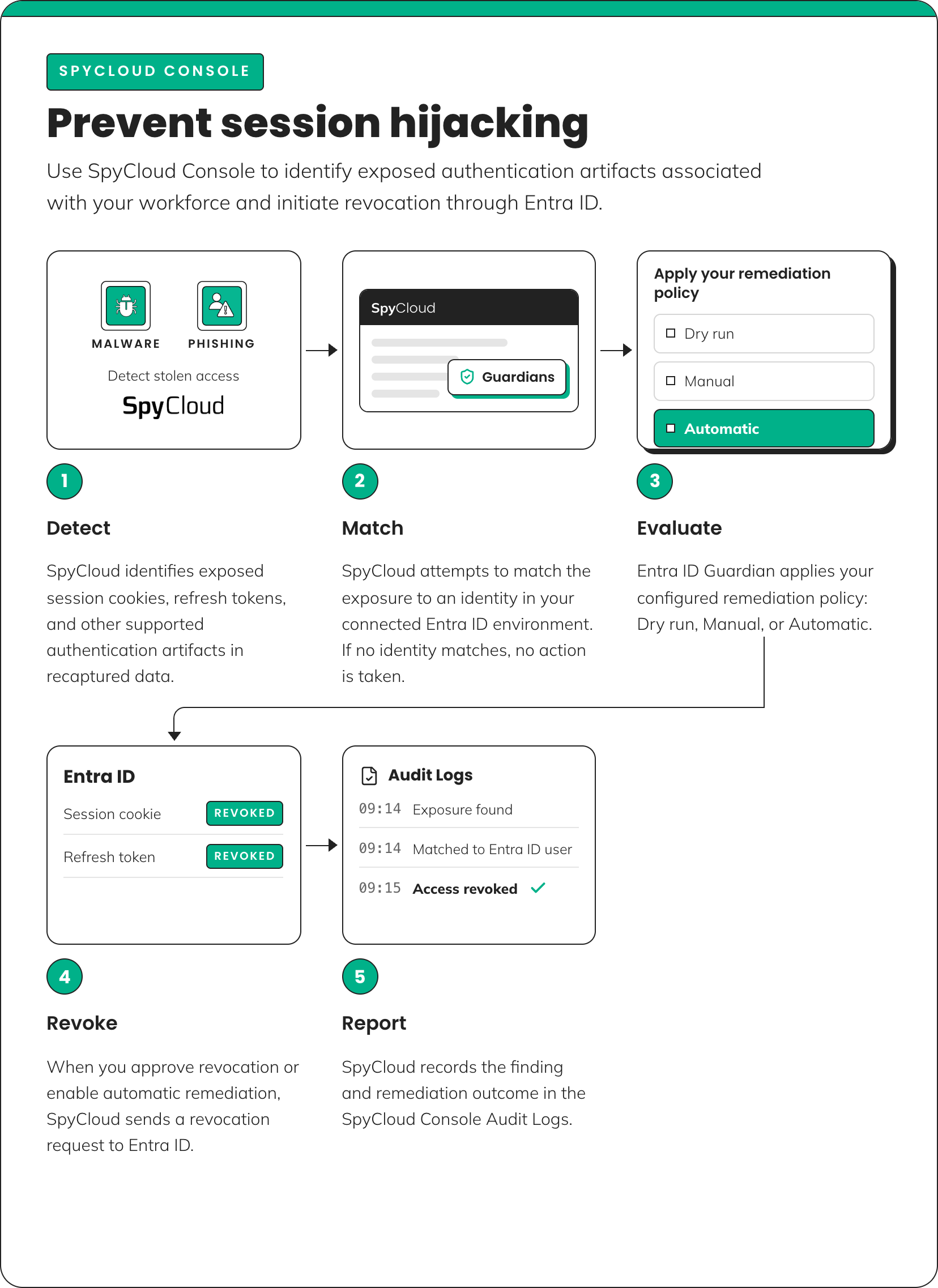
SpyCloud Console: Prevent session hijacking
Use SpyCloud Console to identify exposed authentication artifacts associated with your Entra ID workforce identities and initiate revocation through Entra ID.
Attackers don't always need a password to access an account. Stolen session cookies and refresh tokens can give attackers access to authenticated applications without repeating the normal sign-in process.
Revoking sessions through Entra ID helps disrupt this access and requires users to authenticate again.
How it works
- Detect. SpyCloud identifies exposed session cookies, refresh tokens, and other supported authentication artifacts in recaptured data.
- Match. SpyCloud attempts to match the exposure to an identity in your connected Entra ID environment. If no identity matches, no action is taken.
- Evaluate. Entra ID Guardian applies your configured remediation policy: Dry run, Manual, or Automatic.
- Revoke. When you approve revocation or enable automatic remediation, SpyCloud sends a revocation request to Entra ID.
- Report. SpyCloud records the finding and remediation outcome in the SpyCloud Console Audit Logs.
Remediation policies
Choose how Entra ID Guardian responds to matched exposures.
| Policy | Behavior |
|---|---|
| Dry run | Evaluates findings without revoking access |
| Manual | Requires approval before revocation |
| Automatic | Initiates revocation according to your configured policy |
Notifications and activity
You can configure notifications to receive daily summaries of Entra ID Guardian activity.
Guardian also records findings and remediation outcomes in the SpyCloud Console Audit Logs.
Setup and configuration
See the Session Revocation Guide for detailed setup instructions, configuration options, and tips for getting started.
What session revocation does — and doesn't do
Session revocation doesn't reset exposed passwords. Session revocation helps invalidate exposed access through Entra ID, but it doesn't remediate the underlying password exposure.
Deploy the Azure application to identify confirmed exposed password matches and reset affected passwords.
Requirements
To revoke sessions for Entra ID through SpyCloud Console, you need:
- An active SpyCloud Workforce Threat Protection license
- An Entra ID Guardian license
- Access to the Guardians module in SpyCloud Console
- Entra ID credentials and the appropriate administrative permissions to establish the connection
AZURE APPLICATION - ENTRA ID GUARDIAN
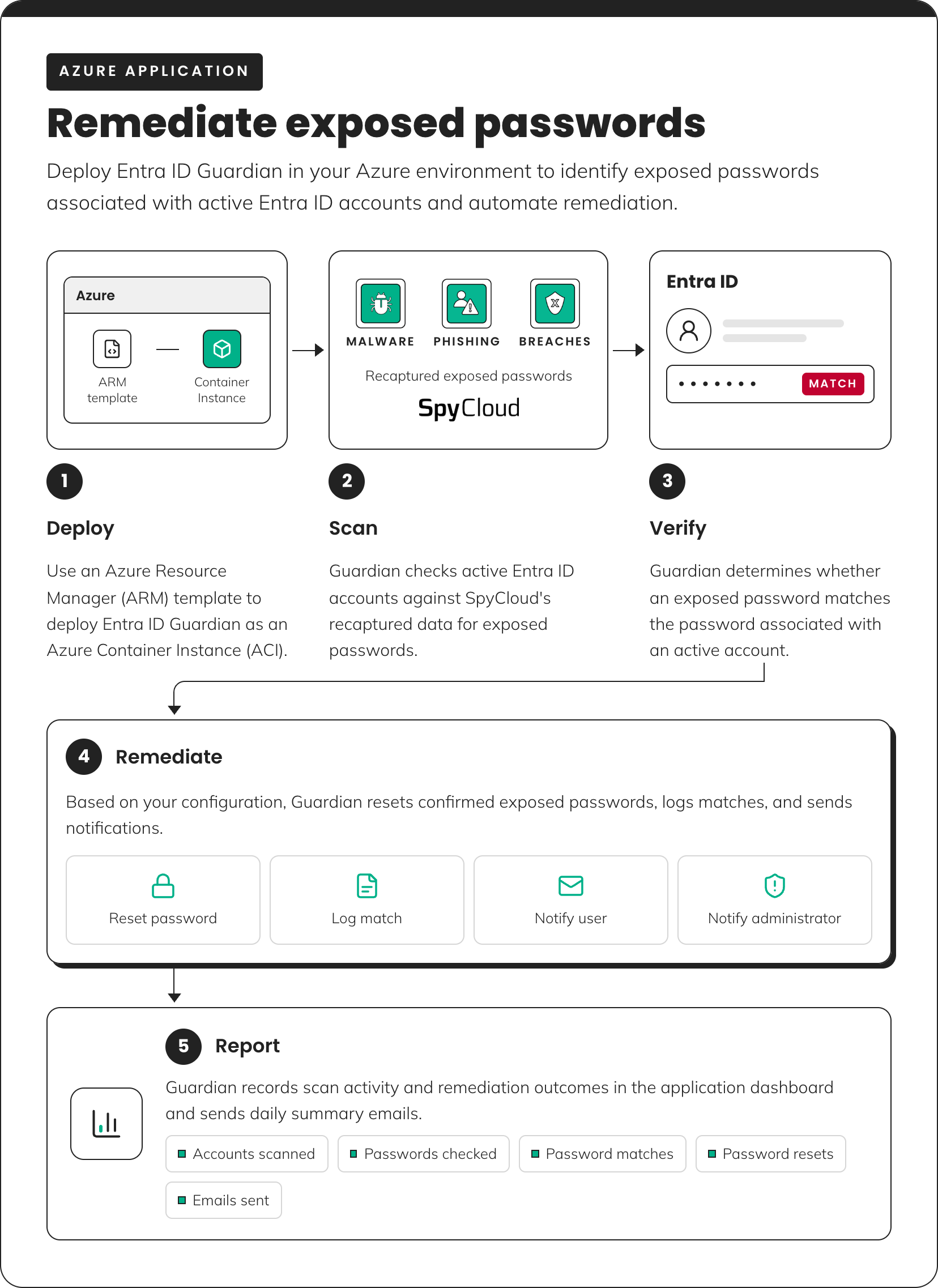
Azure application: Remediate exposed passwords
Deploy Entra ID Guardian in your Azure environment to identify exposed passwords associated with active Entra ID accounts and automate remediation.
How it works
- Deploy. Use an Azure Resource Manager (ARM) template to deploy Entra ID Guardian as an Azure Container Instance (ACI).
- Scan. Guardian checks active Entra ID accounts against SpyCloud's recaptured data for exposed passwords.
- Verify. Guardian determines whether an exposed password matches the password associated with an active account.
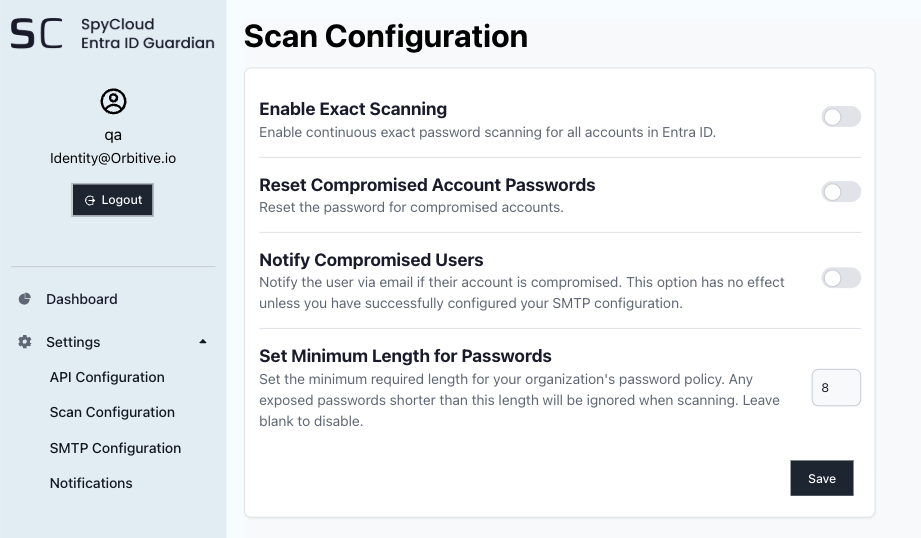
- Remediate. Based on your configuration, Guardian resets confirmed exposed passwords, logs matches, and sends notifications.
- Report. Guardian records scan activity and remediation outcomes in the application dashboard.
Remediation options
Configure how Entra ID Guardian responds when it confirms an exposed password match.
| Action | What it does |
|---|---|
| Reset password | Resets a password after SpyCloud confirms an exact match |
| Log match | Records details about the confirmed credential match |
| Notify user | Sends an email notification to the affected user |
| Notify administrator | Sends an email notification to configured administrative recipients |
NOTE: Password resets can be enabled or disabled based on your remediation configuration.
Review activity
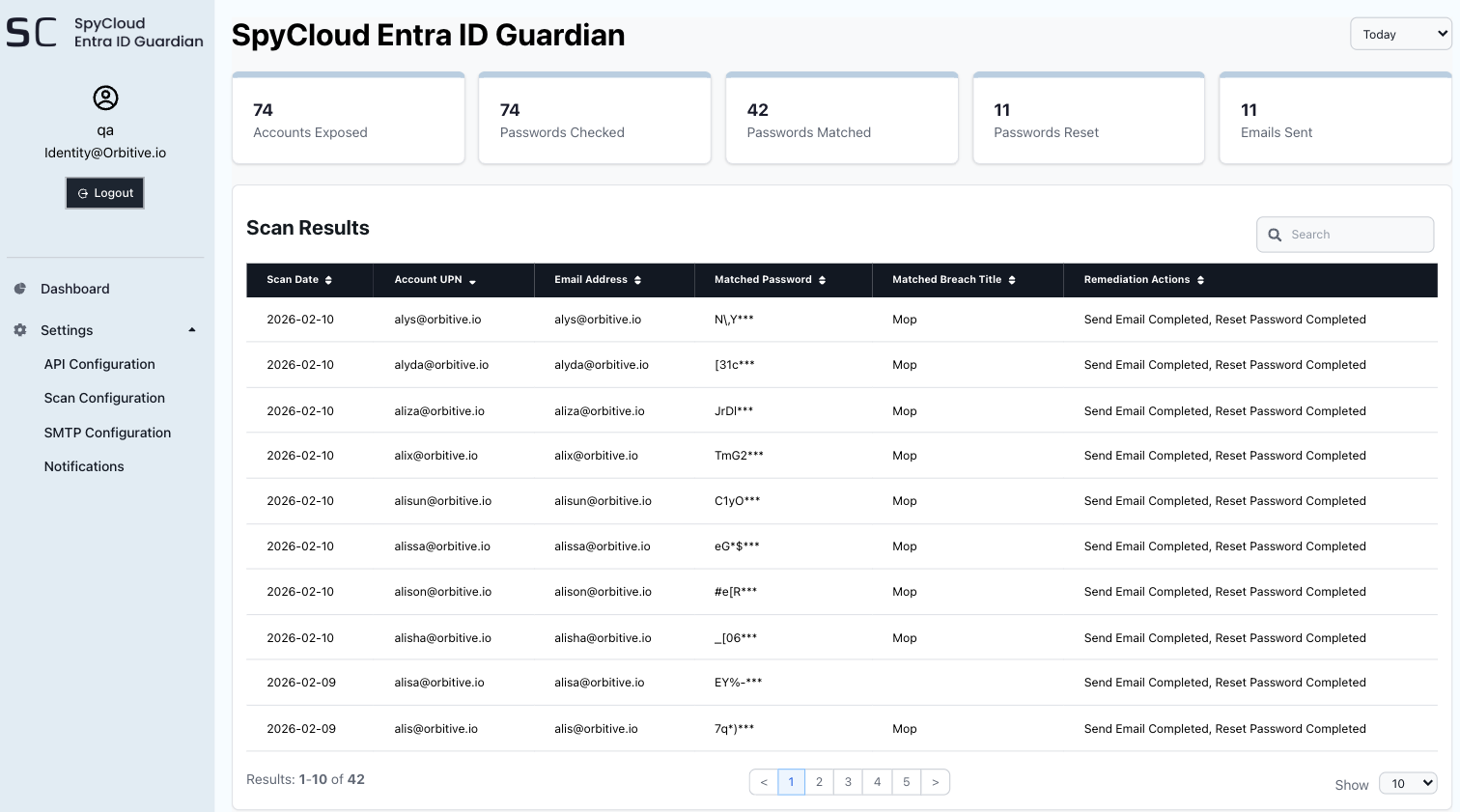
Entra ID Guardian provides reporting for credential scanning and remediation activity in the Azure application dashboard and sends daily summary emails.
The dashboard includes the following metrics:
| Metric | What it shows |
|---|---|
| Accounts scanned | Number of Entra ID accounts evaluated |
| Passwords checked | Number of exposed passwords evaluated |
| Password matches | Number of confirmed matches |
| Password resets | Number of password resets performed |
| Emails sent | Number of notification emails sent |
Requirements
Entra ID Guardian is deployed using an Azure Resource Manager (ARM) template as an Azure Container Instance (ACI), so you don't need to provision a virtual machine.
The application also integrates with your Entra ID directory and SMTP environment.
Before deployment
Make sure you have:
- A SpyCloud Enterprise API key
- Admin-level Azure access
- The required Azure Resource Providers enabled in the subscription where you plan to deploy Entra ID Guardian
Required Azure Resource Providers
The following six Resource Providers must be enabled:
| Resource Provider |
|---|
Microsoft.Network |
Microsoft.KeyVault |
Microsoft.OperationalInsights |
Microsoft.Storage |
Microsoft.App |
Microsoft.Authorization |
Verify that all required Resource Providers are enabled in your Azure subscription before deploying the ARM template.
Protect against exposed passwords and hijacked Entra ID sessions
Exposed passwords and stolen authentication artifacts create different risks for workforce accounts.
- SpyCloud Console helps disrupt unauthorized access by identifying exposed authentication artifacts and initiating session revocation through Entra ID.
- Azure application identifies confirmed exposed password matches and automates the remediation actions you've configured.
Using both implementations helps you address credential-based attacks and session hijacking, including threats that may bypass multifactor authentication (MFA).
Updated about 1 month ago