
Understanding Malware Data
HOW TO VIEW MALWARE EXFILTRATED DATA FROM INFECTED DEVICES
Viewing Malware Data Records
Endpoint Threat Protection structures malware-derived identity exposure into three connected entities:
- Devices
- Applications
- Records
Together, they show how a malware infection on a single machine can expand your organization’s identity attack surface — from the infected device to every exposed credential and application.
💻 Devices
An infected device represents a machine compromised by infostealer malware.
When malware executes, it harvests stored credentials, browser data, and session information. SpyCloud recaptures this data from the criminal underground and associates it with your organization using verified watchlist identifiers.
A device represents a specific infection event, not just a hostname.
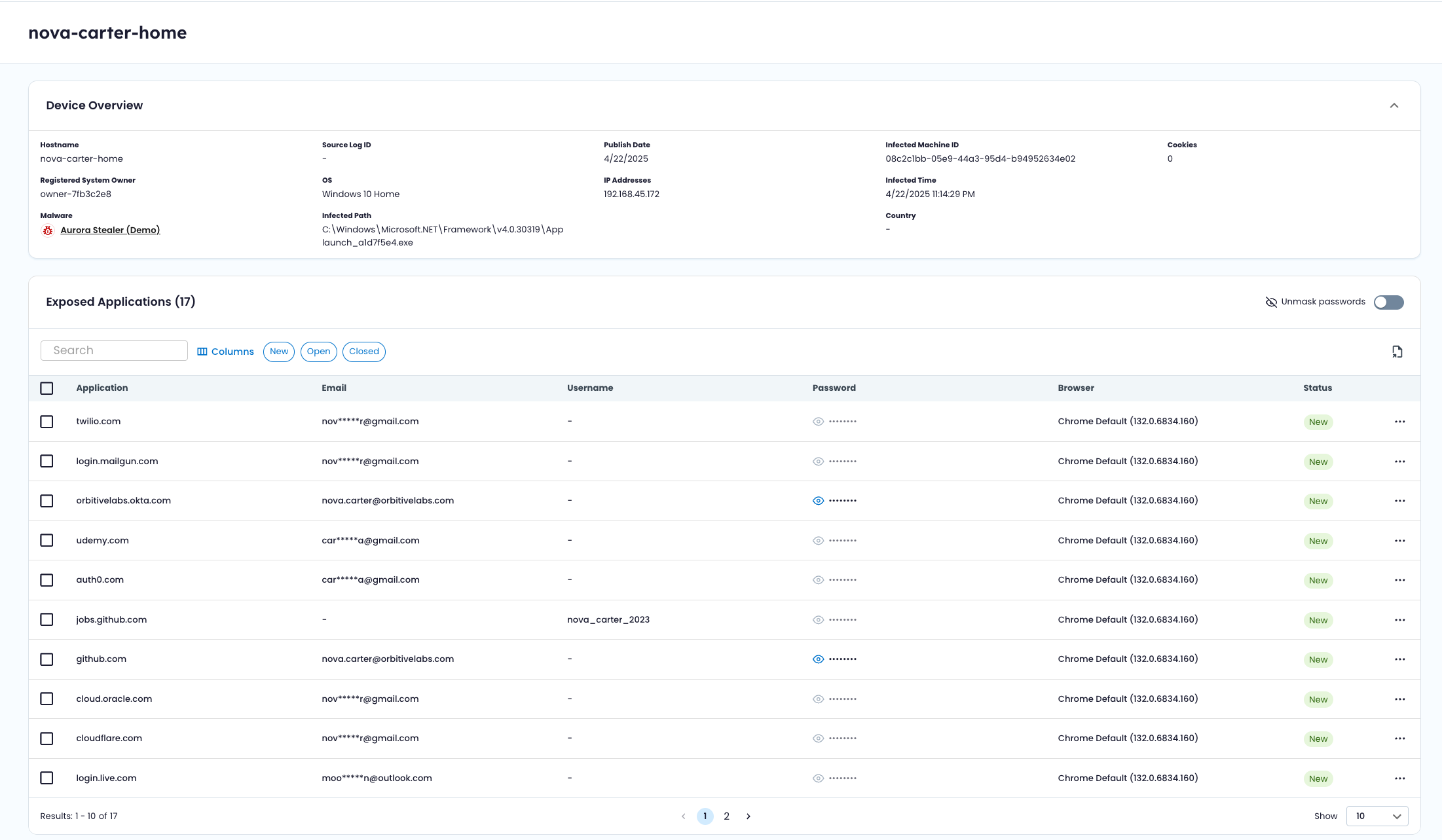
Key Device Attributes
- Hostname – Device name at time of infection
- Infected Machine ID – Unique identifier for the physical system
- Infection Event ID – Unique identifier for a specific infection event
- Malware Family – Infostealer responsible for credential harvesting
- Operating System – OS at time of infection
- Infected Path – File path where malware executed
- Infection Time – When the infection occurred
- Publish Date – When the recaptured data became available
- IP & Geolocation – IP addresses and associated country/location
- Cookie Count – Number of browser cookies exfiltrated
- System Owner – Registered owner of the machine (when available)
A single device may have multiple infection events over time, each tracked independently.
Devices may include:
- Corporate-managed endpoints
- Contractor machines
- Remote or unmanaged systems used to access organizational services
🧩 Applications
An application represents a domain or service where credentials were harvested from infected devices.
Infostealers extract credentials from browsers, password managers, VPN clients, SaaS platforms, and enterprise applications. Each application shown reflects a potential access point where stolen credentials could be reused.
Applications provide an impact view — showing how broadly credentials for a given service were exposed across devices.
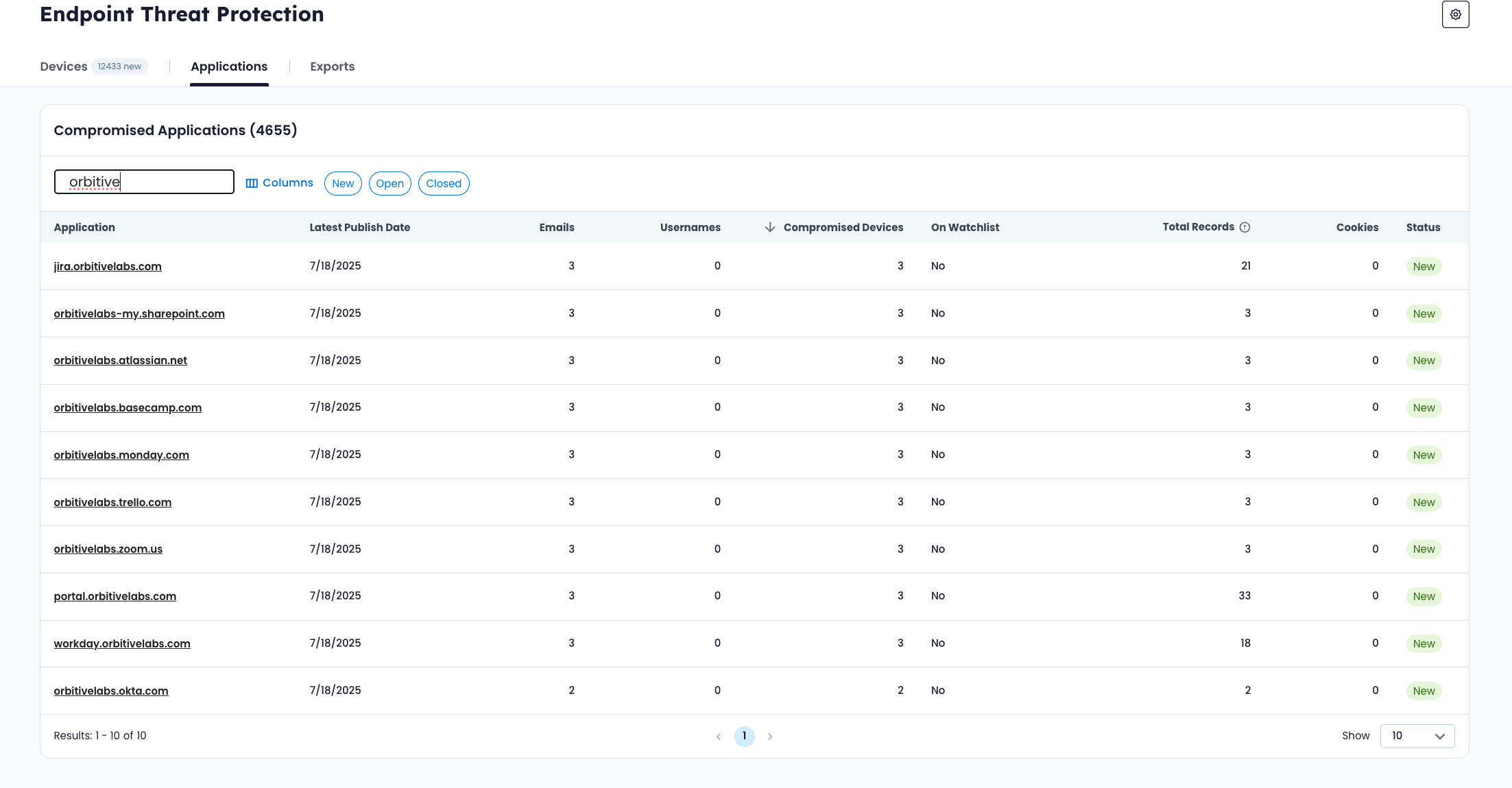
Key Application Attributes
- Application – Domain or service name
- Compromised Devices – Number of infected devices containing credentials for this application
- Emails / Usernames – Unique credential identifiers found
- Total Records – Total credential entries across all devices
- Cookie Count – Number of cookies associated with the application
- First Seen Date – When the application first appeared in infection data
- Latest Infected Date – Most recent infection event involving this application
- Watchlist Status – Whether the application’s domain matches a verified identifier
🍪 Session Cookies
In addition to usernames and passwords, infostealer malware often captures browser session cookies. Endpoint Threat Protection surfaces cookie counts at both the device and application levels to provide visibility into this additional layer of identity exposure.
🔎 Application Watchlist Status
Each application includes a watchlist status indicator:
- Verified – The application’s domain matches a verified watchlist identifier, as a confirmed organizational asset.
- Unverified – The domain matches a watchlist identifier that has not yet been verified.
- No – The domain does not match any watchlist identifier. This typically represents a third-party service where workforce credentials were stored.
This distinction helps differentiate:
- Internal applications exposed via malware
- Monitored but unverified domains
- External services where credential reuse occurred
🧾 Records
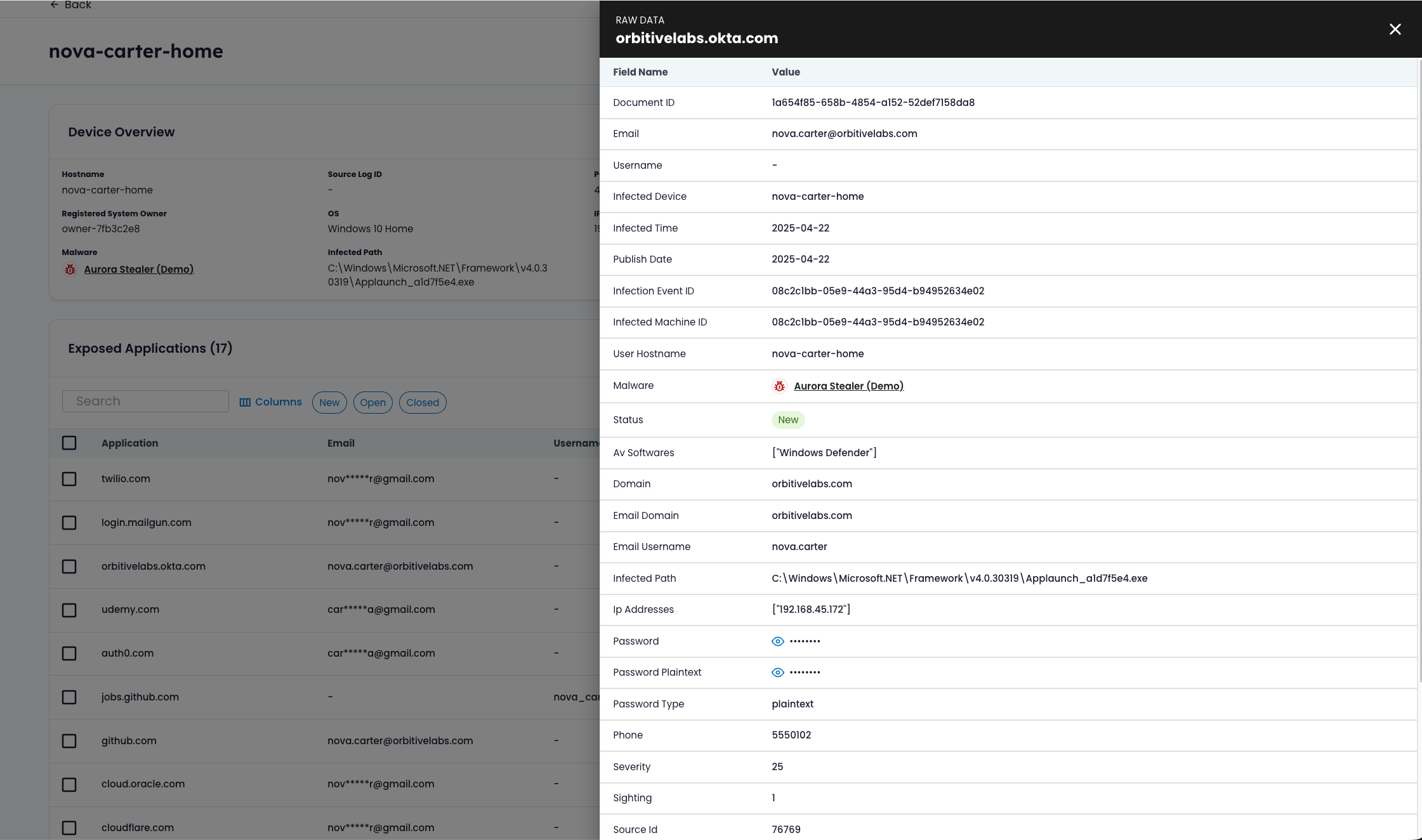
A record is a single credential entry captured from an infected device for a specific application.
If a device is the source of exposure and an application is the potential access point, a record is the evidence.
Record Attributes
- Document UUID – Identifier for the recaptured dataset
- Email / Username – Stolen credential identifiers
- Password – Captured credential (masked by default)
- Infection Event ID – Links to a specific device infection
- Hostname – Device where the credential was harvested
- Malware Family – Infostealer responsible
- Status – Workflow state (New, Open, Closed)
Records allow you to trace identity exposure back to a specific machine and infection event.
🔄 Device-Centric and Application-Centric Views
Endpoint Threat Protection supports two primary perspectives:
Device-Centric
Start with an infected machine to understand:
- What was stolen by infostealer malware
- Which applications were exposed
- Whether multiple infection events occurred
- Whether cookies were captured
Application-Centric
Start with a service or domain to understand:
- How many devices exposed credentials for that service
- Which users were affected
- Whether the domain belongs to your organization
Device view helps assess infection scope. Application view helps assess exposure impact.
🔁 Status Workflow
Devices and individual records include a simple workflow state:
- New – Newly surfaced infection or credential
- Open – Acknowledged
- Closed – Reviewed or resolved
Status supports internal tracking only. It does not modify underlying exposure data.
Device-level and record-level statuses are independent.
🕘 Historical Backfill
When a new domain is added to the watchlist:
- Historical malware data is reprocessed.
- Previously captured infection events tied to that domain may appear.
This means Endpoint Threat Protection can surface past infections associated with newly monitored domains — not just future events.
Updated 6 months ago