
Advanced Search Controls
WITHIN SPYCLOUD INVESTIGATIONS MODULE
OVERVIEW
Inline search additions, a persistent investigation timeline, and record-level removal controls.Expand, refine, and document investigations without restarting their workflow
- Start new searches — including IDLink Analytics — at any point during an investigation
- Remove extraneous searches
- View a reverse-chronological timeline of searches and pivots
- Remove individual records that are not relevant
These controls help you stay in investigative flow while preserving context and methodology.
👇ADD INLINE SEARCHES
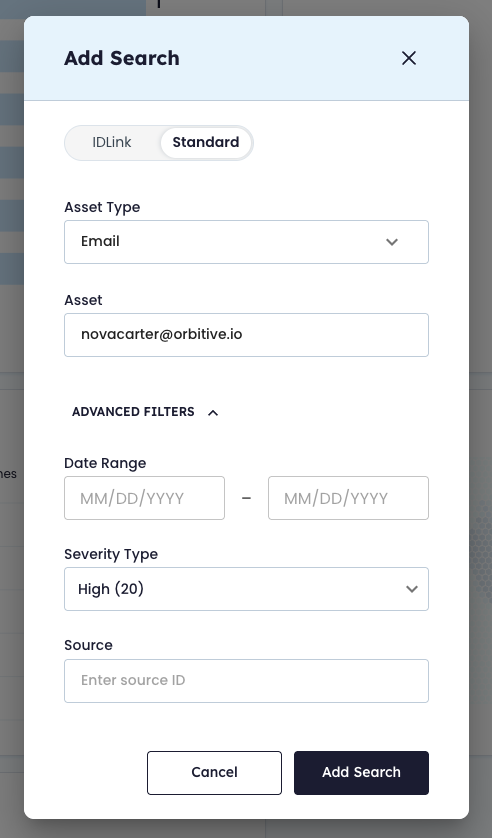
➕ Adding New Assets Inline
You can launch new searches from anywhere within the Investigations module, including:
- Results view
- Graph view
- Any active investigation workspace
This allows you to introduce additional selectors mid-investigation without restarting or losing context.
TipIf you know multiple assets are related to an investigation, start with one asset and quickly add others to expand the aperture of your analysis.
👇ADD INLINE SEARCHES USING IDLINK ANALYTICS
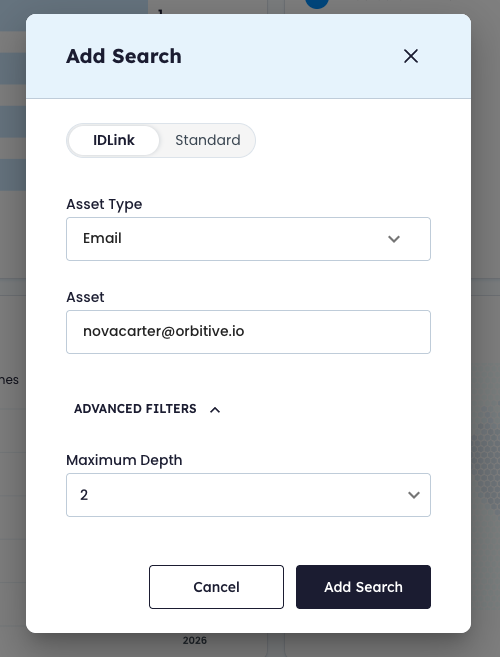
🔎 Supported Search Types
| Search Type | Description | Configurable Options |
|---|---|---|
| IDLink | Relationship-based identity pivoting | Maximum Depth |
| Standard | Direct asset-based exposure search | Date Range, Severity Type, Source |
Both search types can be launched inline at any time.
🧭 How to Add a New Search
- Hover over the Search icon to open the quick menu.
- Select IDLink or Standard.
- Select the Asset Type.
- Enter a single Asset.
- Configure optional advanced filters.
- Click Add Search.
After Submission
- A notification displays the total number of records returned.
- Tables and graphs update automatically.
- The search is added to the investigation timeline.
➖ Removing a Search
You can remove a previously added search from your investigation.
This is useful if:
- The search returned zero results
- The search was added in error
- The results are unrelated
- You want to simplify your investigative narrative
What Happens When You Remove a Search
| Action | Result |
|---|---|
| Remove search entry | Removed from Tracking timeline |
| Remove associated results | Removed from workspace |
| Underlying SpyCloud data | Not deleted |
🧭 How to Remove a Search
- Open the Tracking panel.
- Locate the search entry.
- Select Remove.
The workspace updates automatically.
👇VIEW TIMELINE OF ALL YOUR SEARCHES
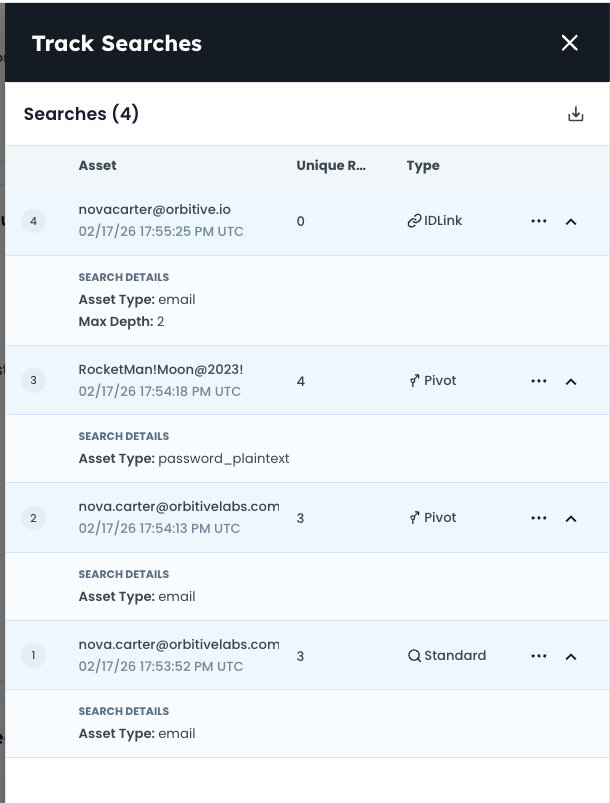
🕒 Investigation Timeline (Tracking)
The Tracking panel provides a reverse-chronological history of your investigation activity.
The timeline:
- Persists across sessions
- Remains tied to the current investigation
- Captures investigative methodology
📊 Timeline Includes
- Searches performed
- Pivots added
- Filters applied
- IDLink depth settings
- Record counts
- Timestamps
📤 Exporting the Timeline
You can export the timeline as a CSV file. The export includes:
| Export Field |
|---|
| Search history |
| Pivot history |
| Filters & depth settings |
| Record counts |
| Timestamps |
Common Use Cases
- Internal documentation
- Audit trails
- Methodology sharing
- Case reporting
👇REMOVE EXTRANEOUS RECORDS
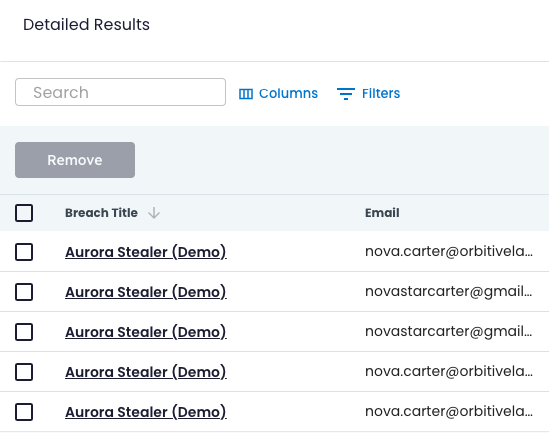
🗑 Removing Records
You can remove individual records from the Detailed Results table.
Removing a record:
- Removes it from the current investigation
- Removes it from associated pivots
- Removes it from graph analysis and tables
- Does not delete it from the underlying SpyCloud dataset
When to Remove a Record
You may remove a record if:
- It contains unrelated assets
- It introduces noise
- It distorts pivot analysis
🧭 How to Remove a Record
- Navigate to the Detailed Results table.
- Open the options menu for the record.
- Select Remove record.
Record removal is permanent within the current investigation.
Bulk removal is not supported.
🔄 Workflow Benefits
Advanced controls over your Investigations allow analysts to:
- Expand investigations without restarting
- Refine scope in real time
- Remove irrelevant noise
- Preserve investigative methodology
- Export an auditable activity history
- Maintain context across sessions
Investigations remain structured, traceable, and aligned with real-world analyst workflows.
Updated 8 months ago