
Threat Index Summaries
View trends & exposures across each darknet data source
Detect identity exposures from malware infections, phishing campaigns, and data breaches tied to your suppliers
Understanding the Summaries
Once you understand what the Threat Index Values are measuring, the next step is learning how to read the summary rollups that explain _what is driving the values. Summaries provide a structured way to understand:
- How employees within a company are being exposed
- Which threat types are contributing most to vendor risk
- Whether vendor exposure is improving or worsening over time
Threat Index Summaries (and how to read them)
Exposure summaries provide a synthesized view of identity exposure across all sources for a given vendor or supplier. They roll up individual exposure events into index values and summaries so you can quickly assess:
- Overall identity security posture
- Dominant exposure types
- Recent activity vs. historical exposure
Exposure Source breakdown
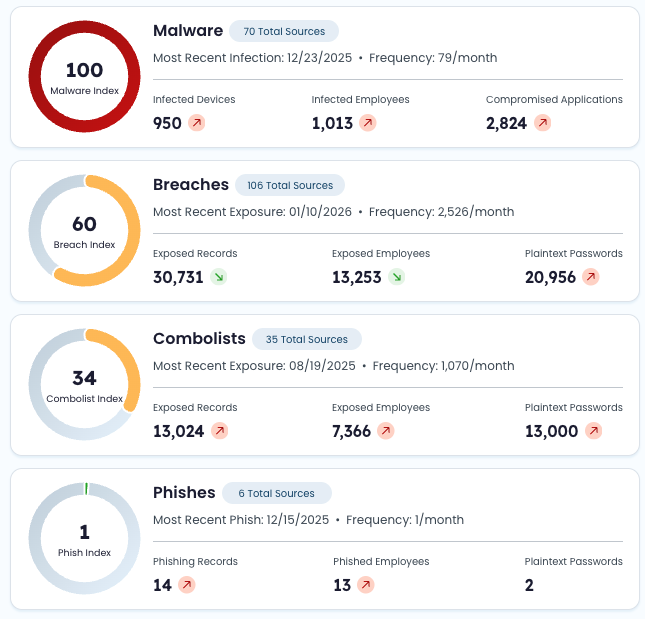
Summaries are organized by exposure source type – showing where a company may be falling short or excelling. Each summary is a 0-100 value, with visual trend indicator if the value changed significantly vs. the previous day.
Summary Rollups (what’s driving the score)
Supply Chain includes summary rollups for each exposure type:
- Malware
- Breaches
- Combolists
- Phishes
These cards complement the indices by answering:
- What changed?
- Why did the score move?
- How broad is the exposure?
Malware Index summary
| Field | Definition |
|---|---|
| Index | 0–100 threat level for the latest completed date of data, based on malware records. |
| Source Total | Total number of malware sources associated with the company. |
| Most Recent Infection | Date of the most recent malware record containing an infected_machine_id. |
| Infected Devices | Total number of unique infected_machine_id values among malware records. |
| Infected Employees | Total number of unique email values among malware records. |
| Compromised Applications | See Top Compromised Applications for applications exposed on infected devices. |
Breach Index summary
| Field | Definition |
|---|---|
| Index | 0–100 threat level for the latest completed date of data, based on breach records. |
| Source Total | Total number of breach sources associated with the company. |
| Most Recent Exposure | Date of the most recent breach record. |
| Exposed Records | Total breach record count. |
| Exposed Employees | Total number of unique email values among breach records. |
| Plaintext Passwords | Total number of breach records containing a plaintext password. |
Combolist Index summary
| Field | Definition |
|---|---|
| Index | 0–100 threat level for the latest completed date of data, based on combolist records. |
| Source Total | Total number of combolist sources associated with the company. |
| Most Recent Exposure | Date of the most recent combolist record. |
| Exposed Records | Total combolist record count. |
| Exposed Employees | Total number of unique email values among combolist records. |
| Plaintext Passwords | Total number of combolist records containing a plaintext password. |
Phish Index summary
| Field | Definition |
|---|---|
| Index | 0–100 threat level for the latest completed date of data, based on phish records. |
| Source Total | Total number of phish sources associated with the company. |
| Most Recent Exposure | Date of the most recent phish record. |
| Phishing Records | Total phish record count. |
| Phished Employees | Total number of unique email values among phish records. |
| Plaintext Passwords | Total number of phish records containing a plaintext password. |
How to use this data effectively
- Start with the Identity Threat Index to assess overall risk
- Review individual indices to identify which exposure type is driving the score
- Use summary cards to understand scope, recency, and severity
- Track trends over time to measure vendor improvement or degradation
- Pair scorecards with investigations to assess real business impact and required action
Updated 9 months ago