
Okta Workforce Guardian
Detects and responds to exposed sessions and credentials tied to your Okta identities
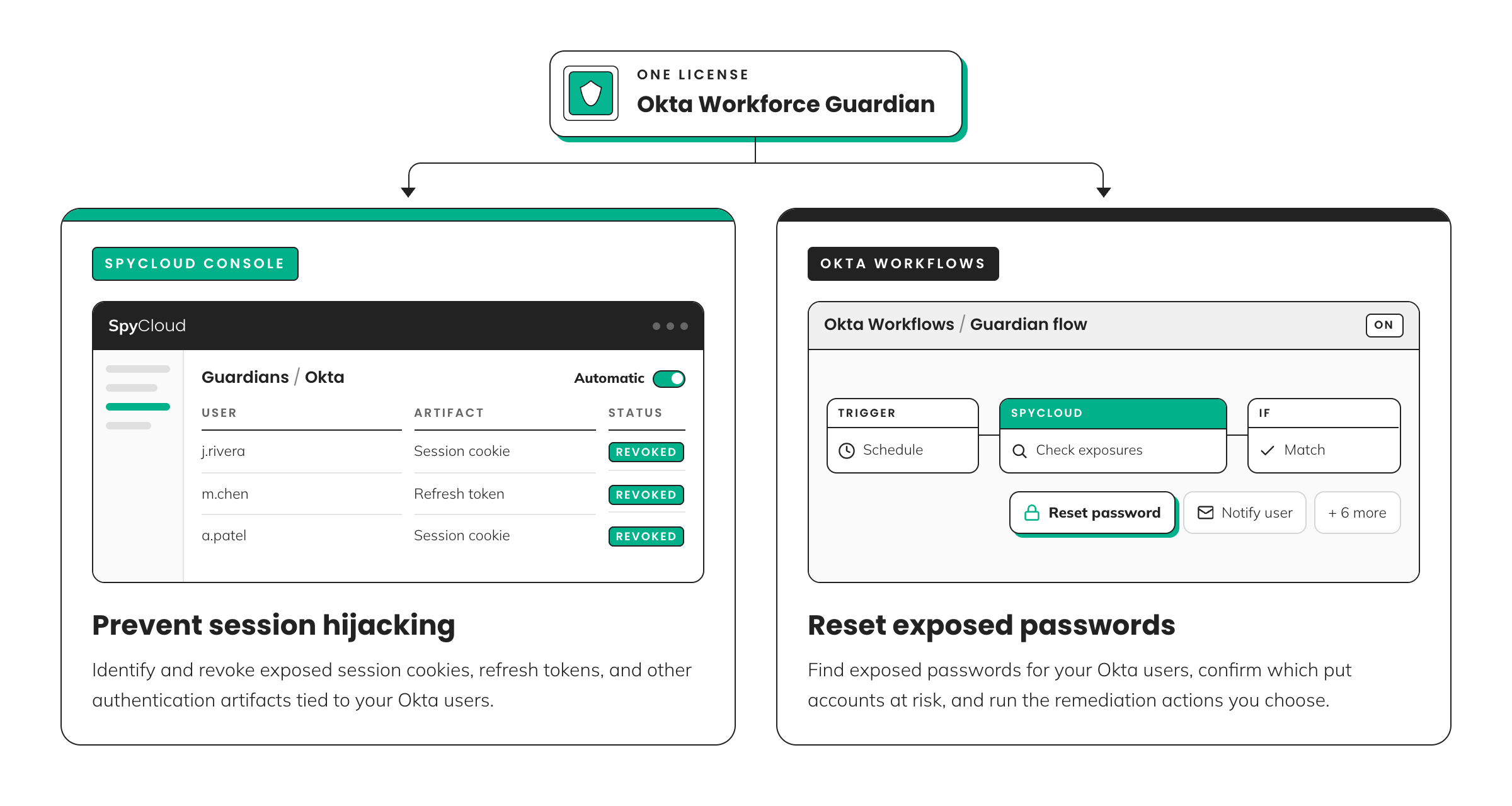
One Okta Workforce Guardian license gives you two ways to protect workforce access:
- SpyCloud Console: Identifies exposed session cookies and refresh tokens associated with Okta users and revokes access according to your configured policy.
- Okta Workflows: Identifies exposed passwords associated with Okta users, verifies which exposures put accounts at risk, and runs the remediation actions you choose.
You can use either implementation or both. Together, they address two ways criminals can gain access to workforce accounts: using exposed credentials or hijacking authenticated sessions.
Two implementations. One license.
Use SpyCloud Console to address exposed authentication artifacts and Okta Workflows to address exposed passwords. Both implementations can run together for broader identity threat protection.
Choose how to use Okta Workforce Guardian
| SpyCloud Console | Okta Workflows | |
|---|---|---|
| Responds to | Exposed sessions, refresh tokens, and other authentication artifacts | Confirmed exposed password matches |
| Use it when | You need to revoke exposed access associated with Okta identities | You need to identify and remediate exposed passwords associated with Okta users |
| Main actions | Revoke exposed sessions and refresh tokens, with support for Okta Universal Logout | Reset passwords, suspend or disable users, revoke sessions, send notifications, create tickets, or run custom remediation |
| Control | Dry run, Manual, or Automatic | Select individual remediation actions and customize workflow logic |
| Runs in | SpyCloud Console | Your Okta tenant |
You don't have to choose one or the other. Each implementation addresses different types of exposed access and can be used independently or together.
SPYCLOUD CONSOLE - OKTA WORKFORCE GUARDIAN
SpyCloud Console: Prevent session hijacking
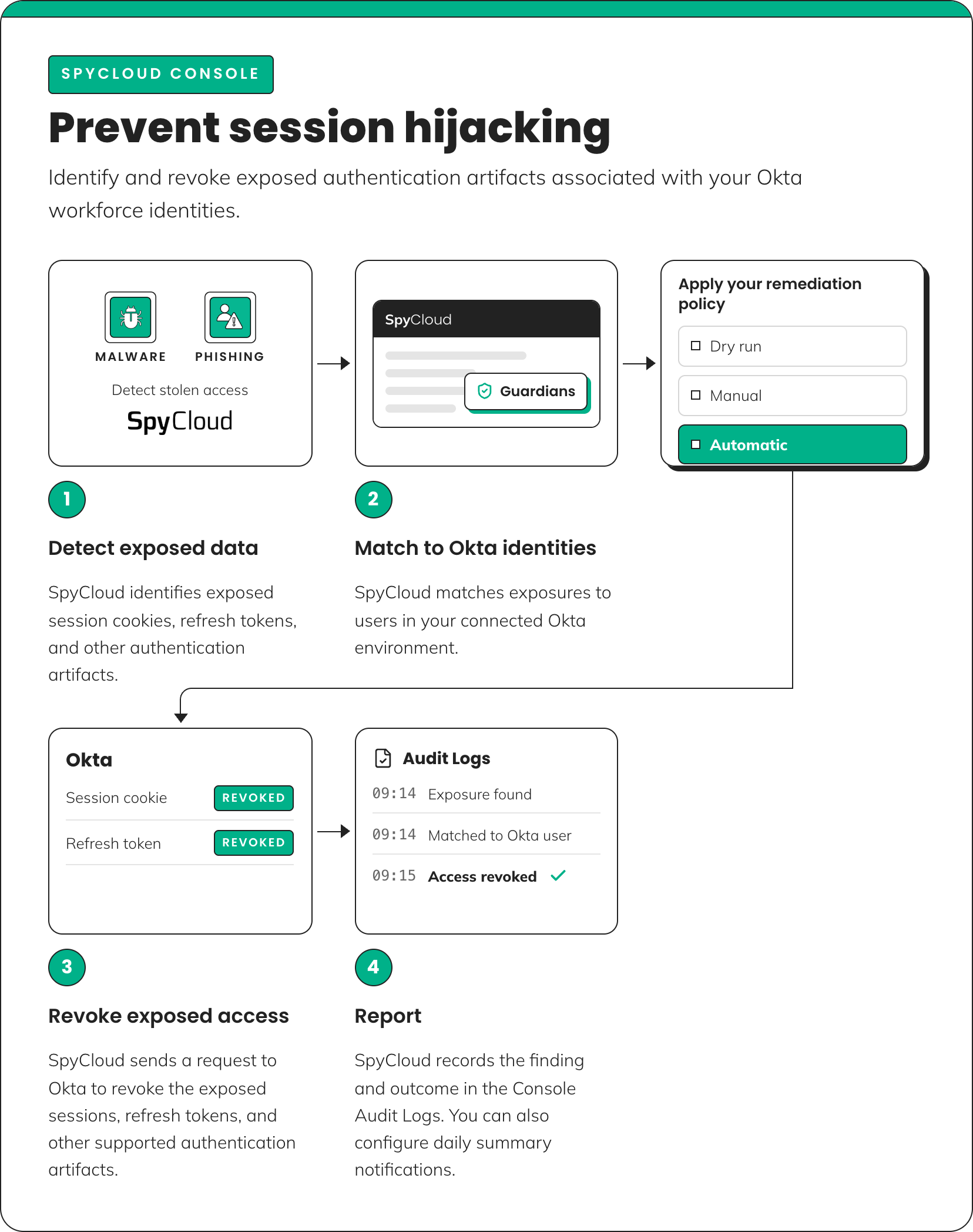
Use SpyCloud Console to identify and revoke exposed authentication artifacts associated with your Okta workforce identities.
When SpyCloud matches exposed access to an identity in your connected Okta environment, Okta Workforce Guardian applies your configured remediation policy.
How it works
- Detect: SpyCloud identifies exposed session cookies, refresh tokens, and other supported authentication artifacts in recaptured data.
- Match: SpyCloud matches exposures from malware infections or successful phishing attacks to identities in your connected Okta environment. If no identity matches, Guardian takes no action.
- Evaluate: Guardian applies your configured remediation policy: Dry run, Manual, or Automatic.
- Revoke: When you approve revocation or enable automatic remediation, SpyCloud sends a request to Okta to revoke the exposed access.
- Report: SpyCloud records the finding and remediation outcome in the Console Audit Logs.
Remediation policies
| Policy | Behavior |
|---|---|
| Dry run | Evaluate findings without automatically revoking access |
| Manual | Require approval before revocation |
| Automatic | Automatically initiate revocation according to the configured policy |
NOTE: You can configure notifications to receive a daily summary of Guardian activity. For detailed configuration and remediation instructions, see the Session Revocation Guide.
Requirements
To use Okta Workforce Guardian in SpyCloud Console, you need:
- An active SpyCloud Workforce Threat Protection license
- An Okta Workforce Guardian license
- Access to the Guardians module in SpyCloud Console
- An Okta Workforce environment and the administrative permissions required to authorize the connection
OKTA WORKFLOWS - OKTA WORKFORCE GUARDIAN
Okta Workflows: Reset exposed passwords
Okta Workforce Guardian includes nine prebuilt Okta Workflows that run inside your Okta tenant.
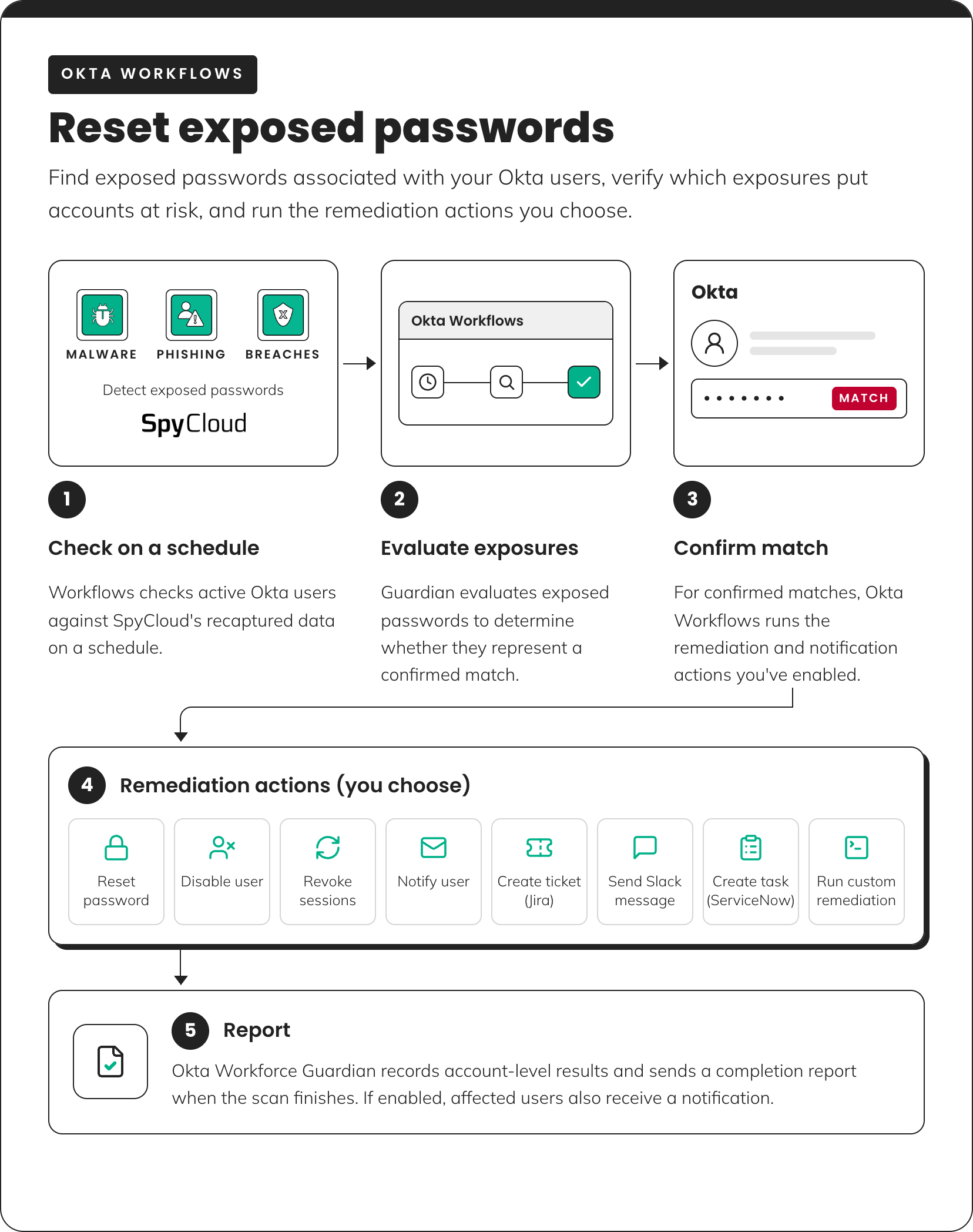
These workflows identify exposed passwords associated with active Okta users, verify confirmed matches, and execute the remediation actions you've enabled.
How it works
- Detect: On a configured schedule, Workflows checks active Okta users against SpyCloud's recaptured data. You can limit scans to a test group while getting started.
- Verify: Guardian evaluates exposed passwords associated with each user to determine whether an exposure represents a confirmed match.
- Remediate: For confirmed matches, Guardian runs the remediation and notification actions you've enabled.
- Report: Guardian records account-level results and sends a completion report when the scan finishes.
You can customize workflow logic to meet your organization's remediation requirements.
Exposure evaluation logic
Guardian evaluates each finding before determining whether remediation should occur.
| Finding | Guardian behavior |
|---|---|
| Active Okta user | Checks the user on the configured schedule, unless scanning is limited to a test group |
| Exposure in SpyCloud data | Records the exposure. An exposure alone does not trigger remediation |
| Exposed password confirmed as still valid | Runs the remediation actions you've enabled |
| Password found through IDLink | Checks the password against the Okta account in the same way as other exposed passwords |
| Exposure without a plaintext password | Records the exposure without attempting verification or remediation |
How IDLink works
IDLink connects records that SpyCloud associates with the same identity, including records tied to personal accounts. This helps identify exposed passwords beyond records directly associated with a corporate email address.
Remediation options
Remediation actions are disabled by default. You choose which actions run after Guardian identifies a confirmed password match.
| Action | What it does |
|---|---|
| Reset password | Forces an Okta password reset |
| Disable user | Blocks user authentication while preserving account configuration and assignments |
| Revoke sessions | Ends active sessions in supported providers, including Okta, Microsoft Entra ID, and Google Workspace |
| Notify user | Emails the affected user a security notification and copies configured notification recipients |
| Jira | Creates a Jira issue |
| Slack | Sends a message to a Slack channel |
| ServiceNow | Creates a ServiceNow task |
| Custom remediation | Runs your organization's custom Okta Workflows logic |
You can combine actions to match your organization's response policy.
Example: A confirmed password match could trigger a password reset and session revocation, notify the affected employee, and create a ticket for your security team.
Remediation actions are off by default. Guardian only runs the remediation actions you've explicitly enabled. Finding an exposure does not automatically trigger remediation.
Exclusion groups
Okta Workforce Guardian supports Exclusion groups to keep selected Okta groups out of scanning and remediation.
For example, you can exclude:
- Administrator accounts
- Service accounts
- Other groups that require separate remediation procedures
Use exclusion groups to align scanning and remediation with your organization's access management policies.
Review scan results
Okta Workforce Guardian records scan activity and account-level results in Okta Workflows.
| View | Information available |
|---|---|
| Current scan | Status of the scan currently running |
| Scan history | Start and completion times, scan status, accounts scanned, confirmed matches, and duration |
| Account results | Exposure records, match type, confirmation status, and remediation actions |
| Error log | Failed steps and their associated workflow, scan, and account |
| Configuration | Current deployment settings |
Completion reports
When a scan finishes, Guardian can send a CSV completion report to your configured recipients.
If user notifications are enabled, Guardian separately emails affected users after a confirmed match.
Completion reports vs. user notifications
- Completion reports summarize scan results for configured recipients.
- User notifications alert individual users about confirmed password exposures.
These notifications serve different purposes and may have different recipients.
Requirements
To use Okta Workforce Guardian with Okta Workflows, you need:
- Okta Workflows with permissions to import and run workflows in your Okta tenant
- SpyCloud Enterprise Protection API access and an API key
- Connections to Okta and SpyCloud
- Gmail or Microsoft 365 Mail for email notifications and reports
Depending on your selected remediation actions, you may also need connections to:
- Microsoft Entra ID, Google Workspace, Jira, Slack, ServiceNow
Identity threat protection with Okta Workforce Guardian
Okta Workforce Guardian addresses two types of exposed access that can put workforce identities at risk.
| Protection | SpyCloud Console | Okta Workflows |
|---|---|---|
| Threat addressed | Session hijacking and misuse of exposed authentication artifacts | Account access using exposed passwords |
| What SpyCloud identifies | Exposed session cookies, refresh tokens, and other supported authentication artifacts | Exposed passwords associated with workforce identities |
| Response | Revoke exposed access through Okta | Verify password matches and trigger configured remediation actions |
SpyCloud Console addresses exposed access. It identifies authentication artifacts such as session cookies and refresh tokens and lets you revoke that access through Okta.
Okta Workflows addresses exposed passwords. It finds exposed passwords associated with your workforce, identifies confirmed matches, and triggers the remediation actions you've configured.
Using both helps you respond whether an attacker has credentials they can use to authenticate or session artifacts that may let them bypass authentication altogether.
Updated about 1 month ago