
Managing Your Watchlist
DEFINE WHAT TO MONITOR WITHIN WORKFORCE THREAT PROTECTION
Watchlist Management
Learn how watchlist identifiers control visibility, matching, and exposure scope in Workforce Threat Protection. The watchlist defines what your organization monitors in Workforce Threat Protection.
All records, dashboards, analytics, and exports are scoped to verified, active identifiers in your watchlist. This guide explains how watchlist identifiers work, how they affect data visibility, and how to manage them effectively.
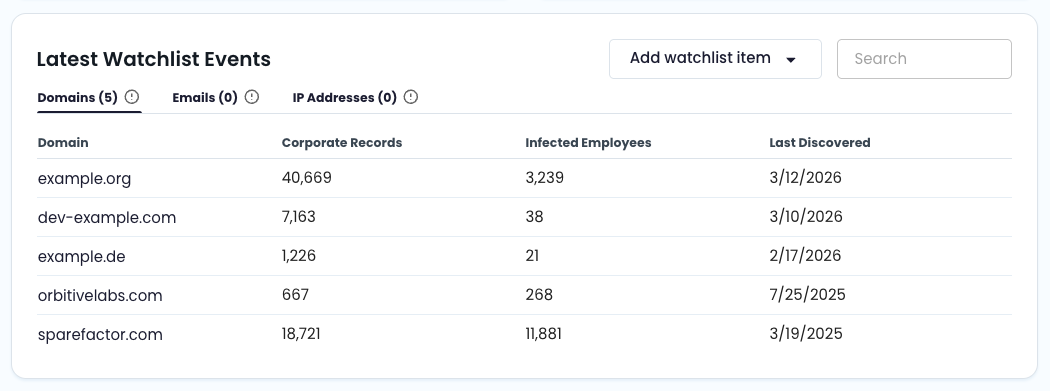
📋 What Is the Watchlist?
The watchlist is a collection of identifiers associated with your organization.
Supported identifier types include:
- Domain (e.g.,
yourcompany.com) - Email address (e.g.,
[email protected]) - IP address (IPv4 address or CIDR range, /16–/32)
- Subdomain (automatically derived from parent domains)
Matching includes historical backfill where available, as well as continuous monitoring of newly recaptured datasets.
🔗 How the Watchlist Drives Data Visibility
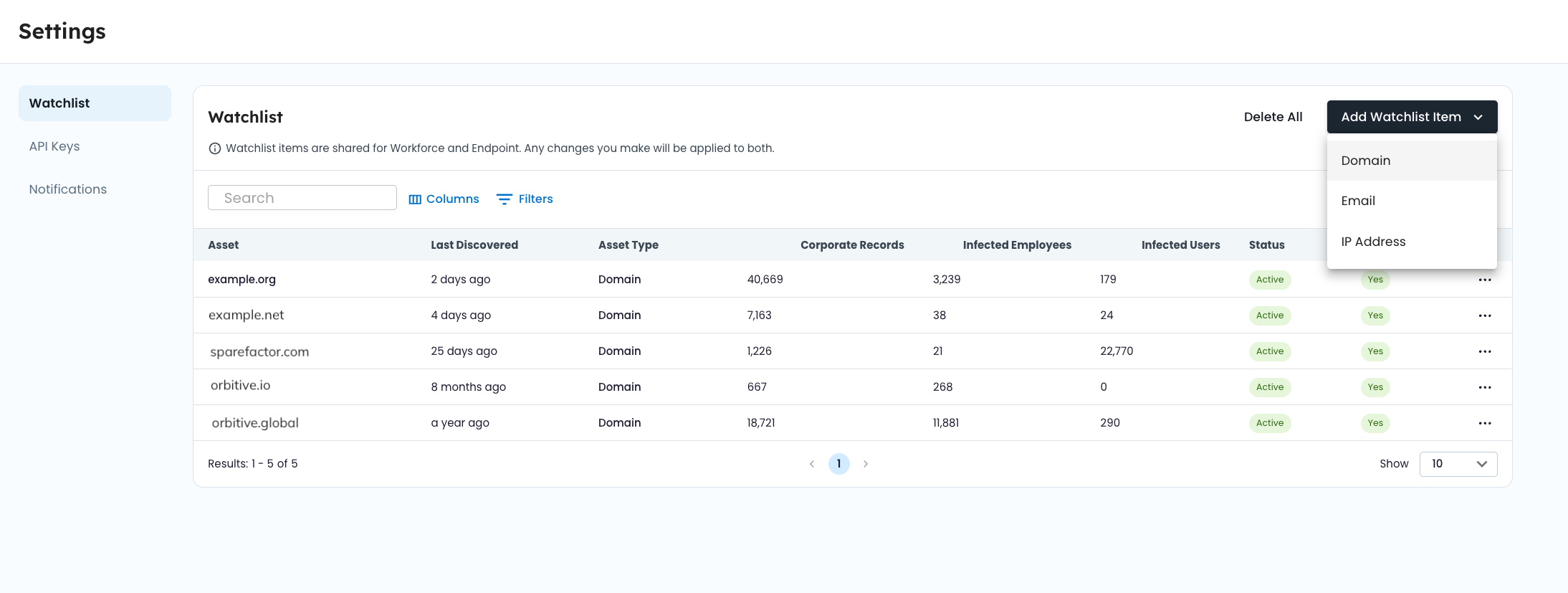
Workforce Threat Protection follows this association model:
Organization → Company → Watchlist → Records
- Your organization is mapped to a company within the SpyCloud console.
- Your company owns a defined set of watchlist identifiers.
- Each recaptured record is matched to watchlist identifiers during ingestion.
- Only matched records tied to verified, active identifiers are visible in your module.
Matching occurs during data processing — not when you search or filter. This ensures consistent analytics and performance across dashboards and record views.
If an identifier is removed, its associated records are removed from view.
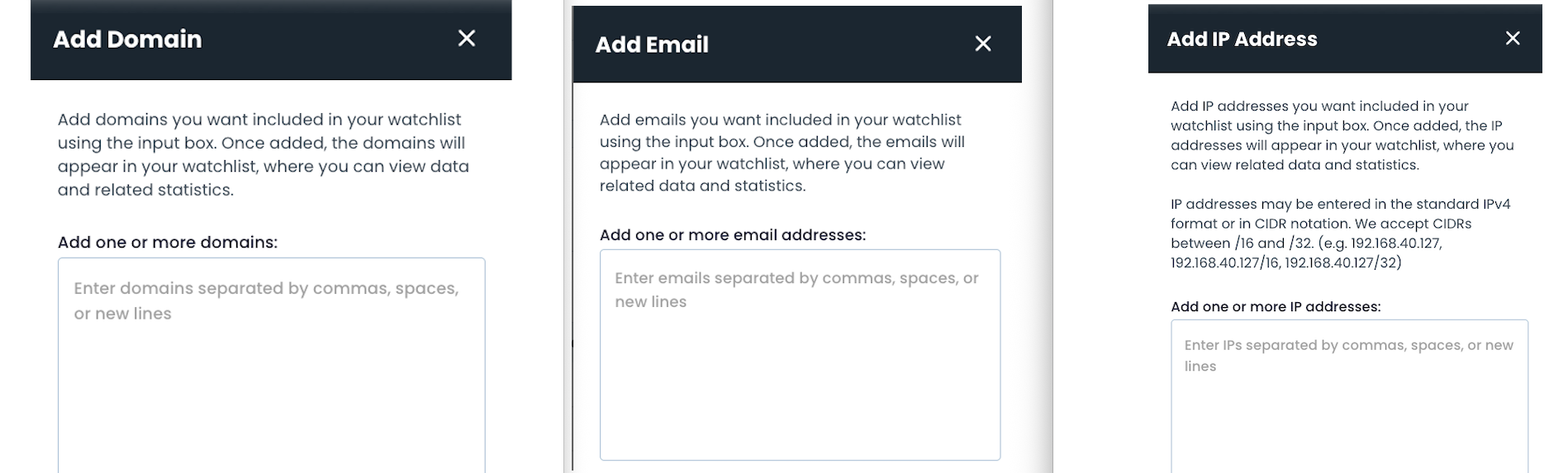
➕ Adding Identifiers
You can manually add:
- Domains
- Individual email addresses
- IP addresses (single IPv4 or CIDR range)
Subdomains are automatically associated when a parent domain is added.
Example:
If yourcompany.com is on the watchlist, records containing auth.yourcompany.com will match automatically.
After adding an identifier, it enters a processing state before becoming active. When you add an email address to your watchlist, it must be verified before it becomes Active.
🔄 Watchlist Statuses
Each watchlist item includes a status that determines whether it produces visible data.
Active
The identifier is fully operational. It is matched against historical and newly recaptured data, and associated records are visible. Only Active identifiers surface data.
Pending
The identifier was recently added and is being processed. Records may not yet appear.
Disabled
Matching is temporarily paused. Associated records are hidden from dashboards and views.
Deleting
The identifier is being removed. Associated records are being disassociated and cleaned up.
✅ Verification
Each watchlist item has a verification state (Yes or No). Only verified identifiers produce visible records.
Verification ensures that monitoring is limited to confirmed organizational assets and prevents unrelated domains or identifiers from introducing noise into your exposure data.
If an identifier is not verified, matching may occur in the background, but records will not appear in Workforce Threat Protection views until verification is complete.
🧠 Identifier Matching Logic
Domain Derivation
When a recaptured record contains an email address, the domain is automatically derived.
Example: A record containing [email protected] matches the watchlist entry yourcompany.com.
Subdomains are also matched to their parent domain.
Example: login.auth.yourcompany.com matches yourcompany.com.
Email Identifiers
Adding a specific email address allows you to monitor exposure tied only to that address, rather than the entire domain. This can be useful for:
- Monitoring high-risk users
- Tracking service accounts
- Narrow-scope investigations
Email Verification
Email addresses are verified through a self-service workflow to confirm ownership.
- Add the email address to your watchlist
- Check the inbox for that email address
- Copy the verification code from the email
- Return to your Watchlist and open the verification prompt
- Enter the code to complete verification. Once verified, SpyCloud will surface any exposure data tied to that email
IP Address Identifiers
IP addresses may be added individually or as a CIDR range.
IP-based matching surfaces records where recaptured datasets include IP attribution tied to your organization. IP identifiers should reflect infrastructure or network ranges associated with your environment.
➖ Removing Identifiers
When you delete a watchlist item:
- It transitions to the Deleting state.
- Associated records are removed from dashboards and record views.
- Analytics recalculate to reflect the updated scope.
Historical matches are no longer visible once the identifier is removed. Use caution when deleting domains or IP ranges, as this may significantly change exposure counts and trends.
⚙️ Operational Considerations
- Ensure all corporate domains (including legacy or regional domains) are added to avoid incomplete exposure visibility.
- Verify email identifiers promptly after adding them
- Periodically review watchlist entries for accuracy and relevance.
- Confirm verification status after adding new identifiers.
- Be aware that disabling or removing identifiers immediately affects dashboard metrics and record counts.
Updated 4 months ago