
Okta Workforce Guardian
Detect and remediate identity threats across your Okta environment - automatically
SpyCloud's Okta Workforce Guardian integrates with Okta to continuously monitor employee identities for signs of exposures across malware infections, phishing attacks, breaches and combolists. When stolen session cookies, credentials, or other authentication artifacts appear in SpyCloud's recaptured data, Okta Workforce Guardian takes action before they can be weaponized.
✨ Benefits at a Glance
Continuous Protection
Validate Okta user identities against SpyCloud’s recaptured malware, phishing, and breached data – updated in near-real-time.
Automated Remediation
Revoke active sessions and refresh tokens, reset passwords, or disable high-risk accounts automatically – minimizing manual effort and response time.
⚙️ How It Works
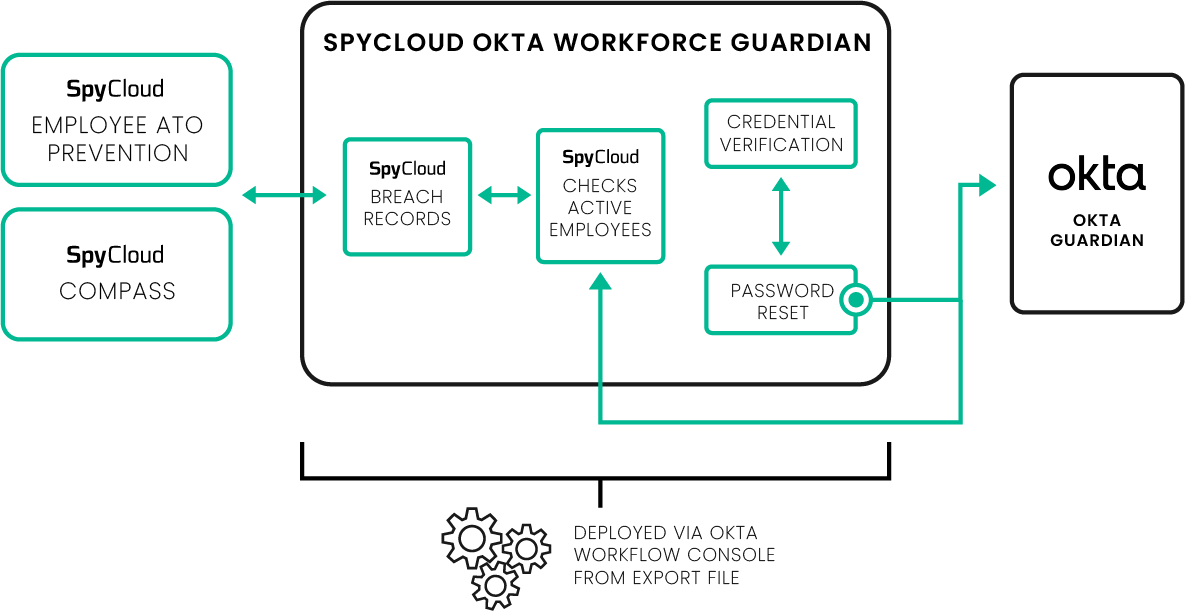
Okta Workforce Guardian continuously checks active employee accounts against 1 trillion recaptured identity assets in SpyCloud's repository.
- Detect – SpyCloud continuously checks Okta Workforce user identities against our recaptured identity data
- Enrich & Analyze – When an exposure is detected and matches your domain, SpyCloud returns enriched identity data to Okta Workflows.
- Automate – Depending on policy configuration, Okta Workforce Guardian can:
- Notify the exposed user or security team
- Revoke active session cookies and refresh tokens
- Terminate the Okta Session, forcing re-authentication (NOTE: SpyCloud recommends enabling Okta's Universal Logout feature to ensure sessions across all connected applications are terminated)
- Enforce password resets
- Disable the user account
- Change user groups
- Trigger downstream workflows (SIEM, SOAR, ITSM)
🔍 What Gets Checked?
| Exposure Source | Action Taken |
|---|---|
| Malware-infected devices | Session revocation and forced re-authentication |
| Successful phishing attacks | Disable or restrict account, terminate sessions |
| Credential reuse detection | Notify user and assign group |
| Breach-stolen credentials | Automated password reset |
📂 Example Scenarios
💻 Infostealer Malware Infection
Detection: SpyCloud identifies session cookies, credentials, and device artifacts exfiltrated from an employee’s infected laptop. The stolen session tokens may still be valid - meaning the attacker can access Okta-protected applications without ever entering a password.
Automated Actions:🔐 Revoke active session tokens
🧱 Flag the device for isolation
⛔ Disable user account until endpoint cleanup is confirmed
🎣 Phishing Compromise
Detection: Modern phishing kits capture valid corporate login, which SpyCloud ingests and publishes within hours of detection. Most kits also harvest session cookies and refresh tokens - rendering MFA bypass a viable follow-on attack
Automated Actions:🚫 Disable user temporarily
🔁 Revoke sessions
🔑 Trigger forced MFA re-enrollment flow upon reactivation
🧠 Compromised Password from Third-Party Breaches
Detection: Employee’s Okta username and password appear in a new third-party breach.
Automated Actions:🔒 Force password reset
🚪 Terminate active sessions
👥 Reassign user to “Elevated MFA Required” group until remediation verified
🔁 Password Reuse Across Personal Accounts
Detection: SpyCloud detects a reused password between a corporate account and a personal account compromised in a breach.
Automated Actions:🔄 Force password reset
📧 Send user awareness notification discouraging credential reuse
🚨 Suspicious Recurrent Exposure
Detection: A user has 3+ exposures within 90 days.
Automated Actions:⚠️ Move user to “High-Risk Identity” group
🧩 Require step-up authentication for all logins
🗓️ Flag account for HR + Security awareness training
📊 Visibility & Reporting
Okta Workforce Guardian provides insight into identity exposure trends and remediation performance.
| 📈 Metric | Description |
|---|---|
| 🧑💻 Exposed Corporate Credentials | Count of unique, exposed corporate credentials |
| 🪪 Account Matches | Number of corporate identities matched to SpyCloud data |
| 🔑 Credential & Session Exposures | Session tokens and compromised passwords detected |
| 🧹 Remediation Actions Applied | Actions automatically triggered via Okta workflows |
⚙️ Technical Requirements
| Requirement | Description |
|---|---|
| 🧱 Okta Workforce Environment | With Workflow Admin or higher privileges |
| 🔑 SpyCloud API Key | Enterprise Protection API access + connectivity |
| 🧩 Workflow Templates | 25 modular customizable Okta Workflow templates |
| 🛰️ Optional Integrations | Connect to SIEM/SOAR tools via webhooks |
| 🧍♂️ Least-Privilege Ready | No Super Admin required |
🚀 Getting Started
- Enable the SpyCloud Enterprise Protection API for your organization.
- Install the Okta Workforce Guardian templates from the SpyCloud Workflow Library.
- Configure remediation actions based on exposure severity and policy.
- Monitor results within your Okta Workflow logs and dashboards.
Why It Matters
SpyCloud Okta Workforce Guardian ensures faster detection, automated remediation, and reduced risk of targeted identity attacks – keeping your workforce safe without adding burden to your security team.
Updated 4 months ago